![Natalia Tishina no tagline signature transparent background [Converted].png](https://static.wixstatic.com/media/e60266_6eb404d3d8ba4e798f3c3c0077a7bb29~mv2.png/v1/fill/w_145,h_63,al_c,q_85,usm_0.66_1.00_0.01,enc_avif,quality_auto/Natalia%20Tishina%20no%20tagline%20signature%20transparent%20background%20%5BConverted%5D.png)


DEFINING THE NORTH STAR
Project Genesis & Scope Definition
This project originated from a critical enterprise customer request tied to a $5 million contract opportunity. The client’s primary objectives were twofold: they required a highly intelligent email assistant capable of automating workflows, paired with a completely modernized, intuitive user interface to elevate the user experience. As the Product Lead, my core challenge was to bridge the gap between bespoke client demands and long-term product strategy. I actively shaped the project's scope to ensure we fully satisfied this high-value client’s immediate needs, while simultaneously establishing a robust foundation for an email assistant that could function natively within our ecosystem.
Balancing Customization with Scalability
Operating as a product house, our strategic vision extended far beyond a single custom implementation. While client satisfaction was paramount to securing the contract, I focused heavily on scalability—ensuring that the underlying architecture and UI components were modular rather than hardcoded. By designing the email assistant as a repeatable feature set, we successfully transformed a bespoke client request into a highly scalable product offering. This strategic approach has already proven successful; the product is currently being distributed to our major Telecommunications (Telco) customers as a core offering, serving as our primary lever to disrupt and win that market segment.
GOAL
The objective was to transition an early-stage LLM prototype into a high-trust, production-ready "Executive Assistant" for business professionals and project managers. My focus was to bridge the user "trust gap," eliminate jarring UX friction points, and design an onboarding experience that demonstrates immediate daily value.
VALUE OF THE AI EXECUTIVE ASSISTANT
The true power of the Executive Assistant (EA) lies in its ability to act as a personalized corporate brain that grows alongside the user, completely eliminating the need for tedious, repetitive reprompting. Unlike standard, transactional AI tools, this EA is designed to quietly learn your specific behavior patterns, adapt to your professional brand voice, and master the intricate context of your unique documents and emails. By deeply understanding what matters most to your workflow, the assistant shifts the user experience from reactive to proactive—anticipating your needs and surfacing critical insights before you even think to ask.
MY LEADERSHIP & IMPACT
-
Successfully translated raw user friction into an actionable, highly prioritized engineering roadmap.
-
Aligned front-end and back-end teams around clear user-centric goals, accelerating development timelines.
-
Provided a scalable design framework prepared for future enterprise needs.
USER RESEARCH & INSIGHTS DISCOVERY
Value Validation
I led two comprehensive rounds of user research that successfully validated our core value proposition: business professionals are overwhelmed by digital clutter and eagerly want to spend less time digging through emailboxes and hunting for files. By designing targeted user testing frameworks and analyzing qualitative feedback, I proved that our solution directly addresses this universal pain point. The research confirmed a strong market demand for a tool that actively reduces daily administrative drag, giving me the clear data needed to confidently shape our strategic roadmap and align our engineering team around high-impact user needs.
Continuous Discovery & Cross-Functional Alignment
Beyond confirming product-market fit, the secondary value of this research was our ability to catch friction early in the user flow, test critical edge cases, and uncover exactly how users would interact with the product in real-world scenarios. I championed high visibility for these testing sessions across the entire company, creating a transparent environment that united cross-functional teams, drove high performance, and perfectly aligned everyone around our immediate development priorities. This deep understanding allowed me to immediately pivot our insights into actionable sprint planning and follow through on critical product enhancements.

DESIGN DELIVERY: FROM VISION TO SCALE

To ensure a seamless handoff to our engineering team and maintain absolute product quality, I developed and delivered two foundational design assets:
The High-Fidelity Mockup Engine
A complete visual blueprint of the AI Executive Assistant ecosystem. This file maps out every critical user flow, including the intuitive folder-sync configuration, onboarding progress states, the post-sync "Wow" moment interface, and refined persona settings. Every layout was directly informed by real-world edge cases discovered during user testing.
The Executive Assistant Design System
A scalable, centralized component library built to bridge the gap between design and development. It establishes a unified visual language—encompassing typography, UI components, states (hover, loading, active), and spacing tokens. This file acts as the single source of truth for front-end engineers, accelerating sprint velocity and protecting design integrity during development.

DESIGN SYSTEM COMPONENTS
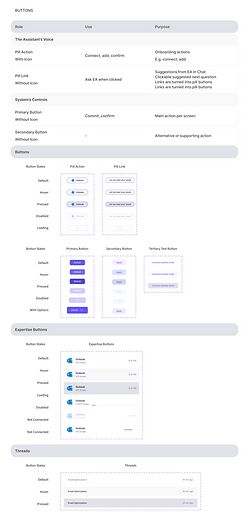
I built the EA Design System using an atomic framework to establish a single source of truth for both design and development. The system is intentionally structured into highly scannable, logical columns to ensure that any designer or front-end engineer can quickly find and utilize components. It spans from foundational tokens to complex interactive UI patterns:
Core Foundations
Established unified definitions for Icons, an extensive Typography hierarchy, and a strict Colors palette (comprising grays, system alerts, and our signature corporate purple) to maintain visual consistency across all features.
Layout & Spacing Architecture
Standardized layout guidelines through defined Spacing blocks and Rounded Corners tokens, eliminating visual debt and arbitrary styling choices during development.
Interactive Components
Developed fully responsive components including Buttons (covering primary, secondary, and ghost variants), Dropdowns, interactive Menus, and collapsible Accordions to handle dense information displays smoothly.
Form & Data Inputs: Built a robust library of Input fields and standalone Elements to support the complex configurations, folder selection, and onboarding flows central to the product experience.
Context & Overlays
Architected informational components like Cards & Shadows, context-providing Tooltips, multi-state Pop-ups, and toast Notifications. These were critical for designing the real-time feedback loop, sync loading states, and the post-sync "Wow" moment discovered during user testing.
Product Impact
By delivering this comprehensive system alongside the high-fidelity mockups, I significantly reduced front-end engineering timelines for Sprint 21. Developers could reference pre-built component states directly, ensuring that the final production build was an exact, high-fidelity match of the intended design.

HIGH-FIDELITY FIGMA MOCKUPS: DESIGNING FOR COMPLEX DATA & USER TRUST
While the design system established our structural foundations, the high-fidelity mockup file served as the interactive blueprint for the entire AI Executive Assistant ecosystem. Designing for an AI product required me to balance complex data density—such as email threads, attachments, and folder indexing—with a clean, approachable UI that minimizes cognitive overload for busy professionals.
Every user flow and screen layout was directly engineered to solve the friction points discovered during our user research sessions:
The Onboarding & Sync Journey
Designed the step-by-step onboarding flow, introducing clear visual progress bars and loading states during the initial Outlook connection. This directly solved the "empty state anxiety" discovered in testing by providing transparent system feedback.
The Post-Sync "Wow Moment"
Created the user interface for the automated "Inbox Summary & To-Do List" pop-up. This layout was positioned to greet the user the exact second indexing hits 100%, instantly demonstrating the proactive value of the assistant.
Data-Dense Right Panel Optimization
Redesigned the right-panel architecture to fix the "Trust Gap". I restructured the information hierarchy to clearly separate "Website Links" from document uploads, and corrected the data visualization logic so that email attachments were no longer incorrectly conflated with standalone files.
Persona & Tone Configuration
Crafted clean configuration screens that allow users to customize the assistant's communication style. I added clear informational tooltips explaining that switching personas alters the tone of voice, not the underlying corporate knowledge domain, preventing user confusion.
Design Strategy Note
Every mockup was built utilizing the exact component variants from our centralized design system. This ensured that when the files were handed off to engineering for Sprint 21, the development team had zero ambiguity regarding interactive states, spacing, or responsive layouts, allowing them to focus entirely on solving the backend retrieval guardrails.


